NOTE
This guide is heavily optimized for Arch, you can adjust it for your system. You can find the source code on SourceHut.
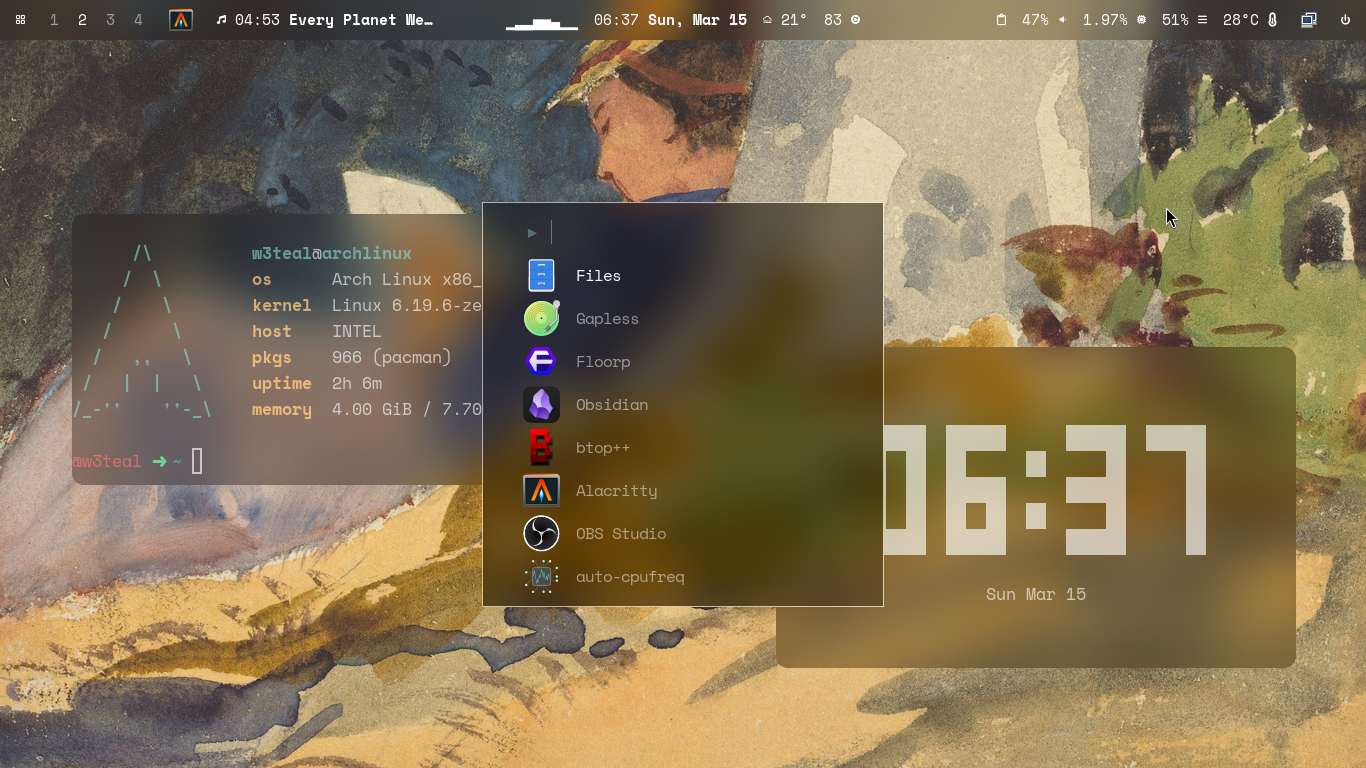 The wallpaper is by National Gallery of Art on Unsplash
Quick start
Tested in my own machine with archinstall, with linux-zen kernel, Niri as desktop, grub as bootloader, ly as display manager.
1. Install Niri (wip branch for blur)
# Install compiler dependencies
sudo pacman -S --needed git base-devel rust clang
cd ~
git clone https://github.com/niri-wm/niri.git
cd niri
git checkout wip/branch
# Can take more than 10 minutes
cargo build --release
sudo cp ~/niri/target/release/niri /usr/local/bin/niri
# Edit niri service point into our binary
systemctl --user edit niri.service --forceAdd this [Service] table between these readable comments, otherwise it will be discarded.
### Anything between here and the comment below will become the contents of the drop-in file

[Service]
ExecStart=
ExecStart=/usr/local/bin/niri --session

### Edits below this comment will be discarded
Super+Shift+E to re-login and verify the version, both Compositor and CLI version should be the same, e.g.
@w3teal ➜ ~ niri msg version
Compositor version: 25.11 (v25.11-142-g92c168f5)
CLI version:        25.11 (v25.11-142-g92c168f5)
2. Packages
alacritty: A cross-platform, OpenGL terminal emulator.bat: A cat clone with wings.ble.sh: Bash Line Editor―a line editor written in pure Bash with syntax highlighting, auto suggestions, vim modes, etc. for Bash interactive sessions.cliphist: Wayland clipboard manager with support for multimediafastfetch: A maintained, feature-rich and performance oriented, neofetch like system information tool.fuzzel: App launcher and fuzzy finder for Wayland, inspired by rofi and dmenu.nvim: Vim-fork focused on extensibility and usabilityoh-my-posh: The most customisable and low-latency cross platform/shell prompt rendererawww: ASolutionAnswer to your Wayland Wallpaper Woes (changed fromswwwsince24b3ca48)waybar: Highly customizable Wayland bar for Sway and Wlroots based compositors.
etc.
ttf-space-mono-nerd: Patched font Space Mono from nerd fonts librarycava: Cross-platform Audio Visualizerlvsk-calendar: A lightweight, modular terminal calendar written in pure Bash.wttrbar: Custom module for showing the weather in Waybar, using the great wttr.inwaybar-module-pacman-updates-git: waybar module for Arch to show system updates availablepavucontrol: A simple GTK based volume control tool (“mixer”) for the PulseAudio sound server.btop: A monitor of resourceschezmoi: Manage your dotfiles across multiple diverse machines, securely.
Install script:
# paru
sudo pacman -S --needed base-devel
git clone https://aur.archlinux.org/paru.git
cd paru
makepkg -si

# Install tools
paru -S alacritty bat cliphist fastfetch fuzzel nvim awww waybar ttf-space-mono-nerd cava lvsk-calendar wttrbar waybar-module-pacman-updates-git pavucontrol btop chezmoi

# oh-my-posh
curl -s https://ohmyposh.dev/install.sh | bash -s

# ble.sh
git clone --recursive --depth 1 --shallow-submodules https://github.com/akinomyoga/ble.sh.git
make -C ble.sh install PREFIX=~/.local
3. Initialize the dotfiles with chezmoi
chezmoi init https://git.sr.ht/~w3teal/niri-dotfiles
chezmoi apply
Super+Shift+E to re-login and enjoy the dotfiles!
4. Extra commands
You can set the wallpaper using awww img <path/to/img>, e.g.
awww img "/home/w3teal/Pictures/national-gallery-of-art-tbTBvZRDXdg-unsplash.jpg"Enable dark mode
gsettings set org.gnome.desktop.interface color-scheme prefer-darkYou can also check my commands page.
This is my first dotfiles guys, do you like it?